World Password Day: May 1, 2025
Written by Michelle Wong – Marketing Specialist
World Password Day for IT Providers & MSPs
World Password Day is another great opportunity for IT Providers and MSPs to educate clients and end users about the importance of good password and cybersecurity habits.
Weak passwords, like “Password1â€, or your pet’s name, make it way too easy for cyber criminals to hack into your systems. Strong passwords and good cybersecurity hygiene can help protect end users’ work and business accounts, and these habits can also be applied to personal logins and devices to help everyone stay safe online.
As our digital world keeps evolving, we need to keep up with the latest cybersecurity best practices to keep ourselves and our end users safe. Below are some additional information and resources for World Password Day.
What is World Password Day?
World Password Day is celebrated annually on the first Thursday of May to encourage people to use stronger passwords and secure their online accounts. Intel created World Password Day in 2013 to raise awareness about the role strong passwords play in securing our digital lives.
Strong passwords are important for protecting sensitive information and preventing unauthorized access. For another layer of protection you should also enable multi-factor authentication (MFA) on accounts for increased security.
Strong passwords aren’t the only way to secure your data. It’s also important to back up your data and store a copy of it to a secure location as an additional layer of protection.
#WorldPasswordDay
Tips for Better Passwords & Security:
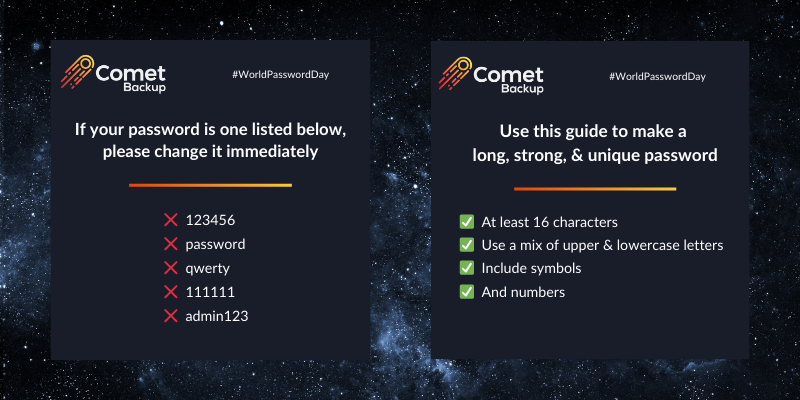
- Use strong passwords – Passwords should be at least 16 characters in length, and a mix of upper-case and lower-case letters, numbers, and symbols.
- Unique passwords for each account – Don’t reuse the same passwords. If one account gets compromised, the same password can be used to access other accounts.
- Consider using passphrases – These are made up of four or more random words, typically longer than a traditional password.
- Use a password manager – These act as a secure, digital vault protected by a single, super strong master password. Password managers can generate strong & unique passwords for each account.
- Enable multifactor authentication (MFA) – Add an extra layer of security, such as getting a code via text message or email, entering a pin number, or biometrics such as face recognition or fingerprint scanning.
Bonus Tip
Always back up your data – Regularly back up your critical data to a secure location, either locally or in the cloud. This ensures you have a copy available to restore in case of a security breach or data loss event.
Test drive Comet Backup with a 30-day FREE trial, or book a discovery call with our team to learn more about how Comet can help your business.
More 2025 IT Holidays + Free Marketing Resources
Check out our blog post on 2025 IT Holidays for more cybersecurity awareness days, and download our free marketing resources to help educate your end users about how they can stay safe in our digital world.

World Backup Day: March 31, 2025
Written by Michelle Wong – Marketing Specialist
Introducing our favorite IT Holiday of the year, World Backup Day! Celebrated on March 31st, World Backup Day highlights the importance of backing up and protecting data.
World Backup Day was created in 2011 and started with a post on Reddit where a user wrote about losing their hard drive and wished someone had reminded them about how important it is to back up data.
This commemorative IT Holiday also happens to fall on the day before April Fool’s Day, so consider it an extra reminder to back up important data and devices to avoid becoming a fool to data loss.
World Backup Day for MSPs & IT Providers
World Backup Day is a great reminder to review your backup strategies and to educate your end users and partners on the importance of data backup.
While World Backup Day is observed annually at the end of March, MSPs and IT providers play a critical role in protecting businesses and organisations every day of the year.
Why is Data Backup Important?
In today’s digital age, data backup and data protection is critical for business continuity and risk mitigation to help organizations protect against:
- Data loss
- Human error
- Ransomware
- Cybersecurity attacks
- Hardware malfunction
- System failure
- Natural disasters
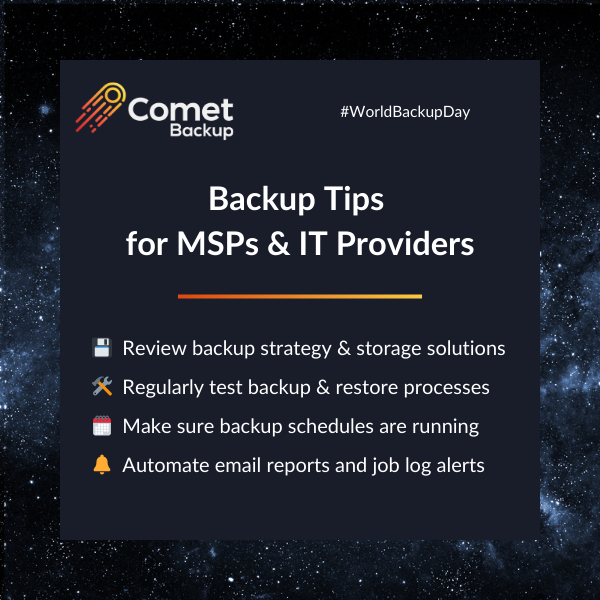
- Review your backup strategy and solutions for different data types, backup types, retention, storage solutions and destinations
- Regularly test your restore and recovery processes to make sure you are ready if an incident happens
- Verify backups and confirm they are running as intended
- Automate processes to save time, such as setting up email reports and job log alerts
- Make sure servers, emails and databases are backed up, not just endpoints
- Easy to use: Comet Backup has an intuitive, easy-to-use web console where you can remotely manage and protect devices. Comet is fast and easy to set up – start running backups and restores in less than 15 minutes.
- Versatile storage options: Choose between integrated cloud storage or utilize your own storage, whether that’s an on-prem solution or a S3 compatible storage provider (including AWS, Azure, Wasabi, Backblaze B2 and more). You’re in control of where your data sits.
- Fast, efficient chunking technology: Advanced backup algorithm packages data into small blocks for faster uploads and downloads, saving valuable time.
- Reliable, Safe & Secure: Data is encrypted during backup, transit, and rest. Comet is also HIPPA and GDPR compliant.
- Client-side deduplication: Reduces redundant data, ensuring more efficient storage usage and therefore cost savings.
- Incremental forever without full re-uploads: After the initial backup, only changes are uploaded, conserving bandwidth, and accelerating the backup process.
- Compression and encryption: Client data is compact for storage efficiency and secured against breaches, ensuring peace of mind.
Having a robust backup solution and solid restore and recovery process will help safeguard against these threats and minimize downtime for your end users and clients.
Reminders for World Backup Day
Comet Backup for MSPs, IT Providers & Businesses
Having a secure and reliable backup platform as part of your tech stack is essential to MSPs & IT Providers’ backup and disaster recovery (BDR) strategy to maintain business continuity in the event of a security incident.
Here are some of the core features & benefits of Comet Backup:
Protect your data this World Backup Day
World Backup Day is a great time to educate and remind your end users and partners of the importance of data backup. Your goal as IT Providers and MSPs is to provide the best support and solutions to give your partners peace of mind and confidence that their businesses’ data is safe and protected.
Test drive Comet Backup with a 30-day FREE trial, or book a discovery call with our team to learn more about how Comet can help your business.
More 2025 IT Holidays + Free Marketing Resources
Check out our blog post on 2025 IT Holidays for more cybersecurity awareness days, and download our free marketing resources to help educate your end users about how they can stay safe in our digital world.
Clean Out Your Computer Day: February 10, 2025
Written by Michelle Wong – Marketing Specialist
What is National Clean Out Your Computer Day?
National Clean Out Your Computer Day was started in 2000 as an initiative of the Institute for Business Technology and falls on the second Monday in February.
The event promotes taking time out of your day to do some basic housekeeping on your computer, such as backing up your computer, organizing your files and folders, updating software, and removing unused files.
Consider it an early start to spring cleaning. Just like any other cleaning or tidying up task, don’t get overwhelmed by trying to do it all at once, break it down into manageable chunks and just start with something easy, like deleting your folder of screenshots.
Before you delete any files, it’s a good idea to make sure you have a backup of your data, just in case!
And don’t forget about wiping the outside of your device, cleaning the screen and keyboard (say goodbye to fingerprints and keyboard crumbs).
Clean Out Your Computer Day for IT Providers & MSPs
IT Providers and MSPs can use Clean Out Your Computer Day to remind end users to create positive digital habits and walk them through how to perform a digital declutter. Below are some tips to show your clients and end users how to observe Clean Out Your Computer Day.
How to Celebrate
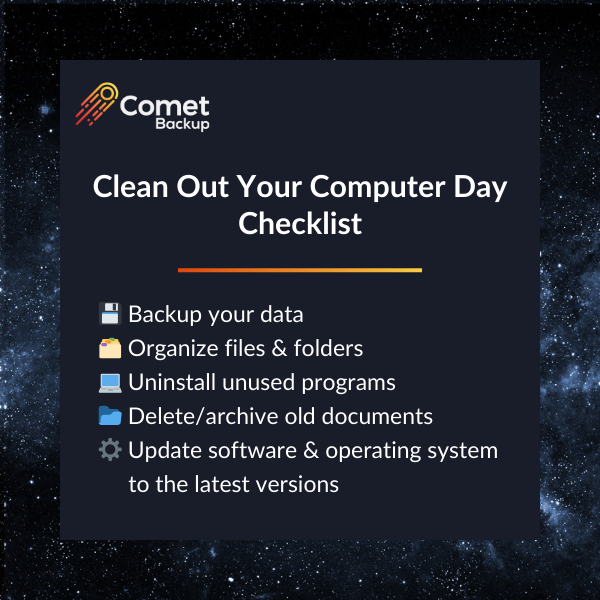
- Backup your computer, including files & folders, documents, and photos
- Organize your folders, documents, and bookmarks (close some of those dozens of internet browser tabs)
- Free up space by deleting or archiving files that you don’t need or don’t use
- Uninstall all the programs you no longer need or use
- Update software to the latest versions
- Tidy up your desktop and downloads folder (and delete all the screenshots and files you don’t need anymore)
- Keep organized – making everything easier to find which will ultimately save time over the coming year
- Make our computers run faster – by deleting unnecessary files and uninstalling unused applications
- Give us peace of mind – by making sure our important files are properly saved and backed up, either locally or to the cloud, or both.
- https://nationaltoday.com/national-clean-out-your-computer-day/
- https://www.daysoftheyear.com/days/clean-out-your-computer-day/
- https://www.nationaldaycalendar.com/national-day/national-clean-out-your-computer-day-second-monday-in-february
Why is it Important?
National #CleanOutYourComputerDay is another reminder to help us create good digital and cyber hygiene habits. Cleaning up and tidying our personal and work computers can help us:
Below is a checklist and some additional references and resources about Clean Out Your Computer Day.
More 2025 IT Holidays + Free Marketing Resources
Check out our blog post on 2025 IT Holidays for more cybersecurity awareness days, and download our free marketing resources to help educate your end users about how they can stay safe in our digital world.
References:
Data Privacy Week: January 27-31, 2025
Written by Michelle Wong – Marketing Specialist
What is Data Privacy Week?
Each year the National Cybersecurity Alliance (NCA) organizes Data Privacy Week to educate people about the importance of safeguarding personal data and ensuring online privacy and safety.
The goal of Data Privacy Week is to spread awareness about online privacy and reminding individuals that you have the power to manage your data.
Data Privacy Week for IT Providers & MSPs
IT Providers and MSPs can use Data Privacy Week as an opportunity to teach your clients about their data privacy and to remind end users to double check the information they are sharing on their apps and devices.
We’ve put together some information and resources to help you educate your end users.
Why is Data Privacy Week Important?
Data is collected everyday – from your computer, smartphone, smartwatch, and pretty much every other internet-connected device. All of your online activity generates a trail of data.
Data Privacy Week acts as a reminder to double check and update the settings on your apps, accounts and connected devices to decide how this data is collected and used.
Privacy Trends in Tech
Even the tech titans like Apple are bowing to the importance of data privacy as evidenced by their 2020 decision to roll out the Apple App Tracking Transparency feature to iOS 14.5. Apple’s App Tracking Transparency feature allows users to choose whether an app can track your activity across other companies’ apps and websites for advertising targeting. The impact of Apple’s App Tracking Transparency feature upended the mobile ad industry, which largely relies on user data.
With the emergence of AI (artificial intelligence) and the ever-changing landscape of technology and cybersecurity, we expect to see more laws and regulations around data privacy, following the General Data Protection Regulation (GDPR) in 2018 across Europe and the California Consumer Privacy Act (CCPA) in 2019 in the US.
But complying with regulations and relying on the tech industry to design better privacy controls isn’t enough. It’s important to proactively protect yourself, your clients and your company from unnecessary data collection.
Take Control of Your Data
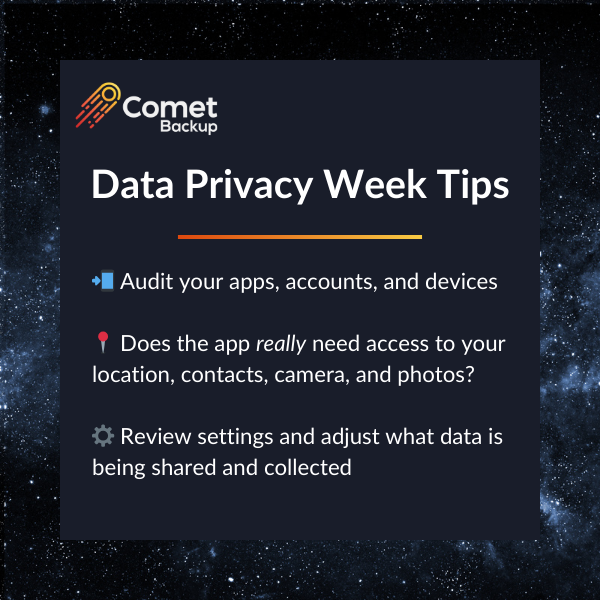
The 2025 theme for Data Privacy Week is ‘Take Control of your Data’. Here are some easy tips and reminders from the NCA to help you manage your data privacy:
Â
- Know the trade-off between privacy and convenience – does each app or account need access to certain data (such as your contacts or photos or camera)?
- Adjust privacy settings to your comfort level. Audit your apps, accounts, and double check the privacy and security settings on your devices.
- Protect your data with several layers of security, including using secure passwords and multi-factor authentication (MFA).
- Install updates – as annoying as is to take time to update your software, it is important because updates help patch security flaws, deploy bug fixes, add new features, and help keep your devices running smoothly.
- What is Data Privacy And Why Should you Care?
- Data Privacy Week
- Take Control of Your Data
- Cybersecurity Predictions for 2025: Challenges and Opportunities
More 2025 IT Holidays + Free Marketing Resources
Check out our blog post on 2025 IT Holidays for more cybersecurity awareness days, and download our free marketing resources to help educate your end users about how they can stay safe in our digital world.
Below are some additional resources from the National Cybersecurity Alliance.
Resources:
2025 IT Holidays & Cybersecurity Awareness Days
Written by Michelle Wong – Marketing Specialist
As we begin the new year, it’s a great time to look ahead and mark your calendar with key dates, including upcoming 2025 IT and cybersecurity holidays.
These holidays and awareness days are a fun opportunity to highlight and teach the importance of cybersecurity to your clients or end users, or show appreciation for your team.
Free Marketing Resources
Short on time? Use our pre-written social media posts and our kit of re-brandable graphics to educate your end users throughout the year.
Download the marketing campaign-in-a-box here.
Don’t forget to add these dates to your calendar!
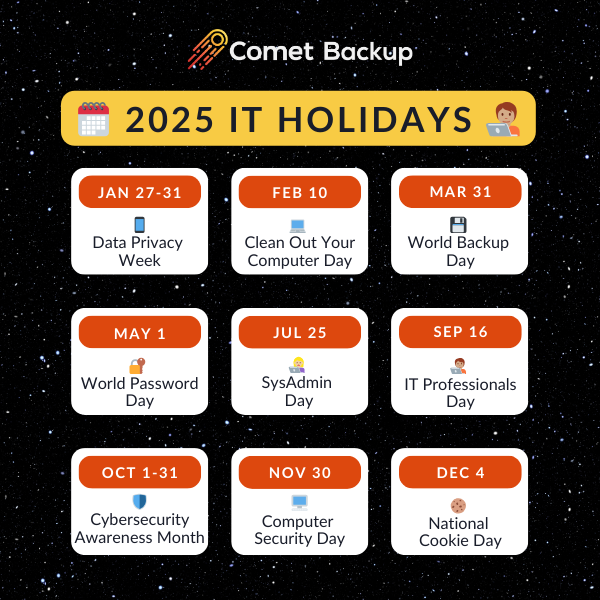
Data Privacy Week
January 27-31, 2025
The National Cybersecurity Alliance (NCA) organizes Data Privacy Week to spread awareness about the importance of safeguarding personal data and ensuring online data privacy and safety. Our data is collected everyday – from your computer, smartphone, smartwatch, and pretty much every other internet-connected device. You can check and update the settings on your apps and devices to decide how this data is collected and used.
#DataPrivacyWeek
References:
- https://staysafeonline.org/programs/data-privacy-week/
- https://nationaltoday.com/national-clean-out-your-computer-day/
- https://www.daysoftheyear.com/days/clean-out-your-computer-day/
- https://www.timeanddate.com/holidays/fun/clean-out-your-computer-day
- https://www.nationaldaycalendar.com/national-day/national-clean-out-your-computer-day-second-monday-in-february
- https://www.daysoftheyear.com/days/world-backup-day/
- https://www.nationaldaycalendar.com/international/world-backup-day-march-31
- https://www.worldbackupday.com/en
- https://nationaltoday.com/world-backup-day/
- https://www.passwordday.org/
- https://nationaltoday.com/world-password-day/
- https://www.daysoftheyear.com/days/password-day/
- https://www.nationaldaycalendar.com/national-day/world-password-day-first-thursday-in-may
- https://sysadminday.com/
- https://www.daysoftheyear.com/days/system-administrator-appreciation-day/
- https://www.nationaldaycalendar.com/national-day/system-administrator-appreciation-day-last-friday-in-july
- https://nationaltoday.com/system-administrator-appreciation-day/
- https://nationaltoday.com/national-it-professionals-day/
- https://www.nationaldaycalendar.com/national-day/national-it-professionals-day-third-tuesday-in-september
- https://www.holidaycalendar.io/holiday/national-it-professionals-day
- https://staysafeonline.org/programs/cybersecurity-awareness-month/
- https://www.cisa.gov/cybersecurity-awareness-month
- https://www.timeanddate.com/holidays/fun/computer-security-day
- https://nationaltoday.com/national-computer-security-day/
- https://www.nationaldaycalendar.com/national-day/computer-security-day-november-30
- https://www.daysoftheyear.com/days/cookie-day/
National Clean Out Your Computer Day
February 10, 2025
National Clean Out Your Computer Day was started in 2000 as an initiative of the Institute for Business Technology and falls on the second Monday in February. The event promotes taking time out of your day to do some basic housekeeping on your computer, such as organizing your files and folders, updating software, and removing unused files. Before you delete any files, it’s a good idea to make sure you have a backup of your data, just in case! Don’t forget about wiping the outside of your device, and cleaning the screen and keyboard.
#CleanOutYourComputerDay
References:
World Backup Day
March 31, 2025
World Backup Day on March 31st is one of our favorite IT holidays on the calendar (for no specific reason). World Backup Day reminds us to backup and protect our data. In today’s digital age, data backup and data protection is critical for businesses and organisations to help protect against cyberattacks, ransomware, system crashes, human error, and more. Having a robust and secure backup solution, like Comet Backup, will help safeguard against these data loss threats.
#WorldBackupDay
References:
World Password Day
May 1, 2025
World Password Day is celebrated annually on the first Thursday of May to encourage people to use stronger passwords and secure their online accounts. Strong passwords are important for protecting sensitive information and preventing unauthorized access. For another layer of protection you can also use two-factor authentication (2FA) to secure your accounts for better security.
#WorldPasswordDay
References:
System Administrator Appreciation Day
July 25, 2025
System Administrator Appreciation Day (SysAdmin Day) honors IT professionals who work behind the scenes to keep our IT systems, networks, servers, and technology running smoothly at businesses and organizations across the world. Shout out to our everyday IT heroes!
#SysAdminDay
References:
IT Professionals Day
September 16, 2025
We celebrate IT Professionals Day on the third Tuesday of September to recognize the technical IT experts that make sure our systems run smoothly. Whether its desktops, laptops, mobile devices, printers, applications, servers, networks, databases or cybersecurity, IT professionals keep our businesses humming. IT Pro Day recognizes the critically important role of these technical experts.
#ITProDay
References:
Cybersecurity Awareness Month
October 1-31, 2025
In October, Cybersecurity Awareness Month is an international initiative that educates everyone about online safety and empowers individuals and businesses to protect their data from cybercrime. Cybersecurity Awareness Month reminds everyone that there are simple, effective ways to keep yourself safe online, protect your personal and business data, and ultimately help secure our world.
#CybersecurityAwarenessMonth
#SecureOurWorld
References:
Computer Security Day
November 30, 2025
Computer Security Day was first launched in 1988 by the Association for Computer Security. Since then, the way we use computers has changed. Today, we use computers to stay connected almost every day – working from home, shopping online, internet banking, streaming movies, social media, and more. Computer Security Day encourages individuals and businesses to adopt good virtual habits and be proactive in protecting your data in our modern digital world.
#ComputerSecurityDay
References:
National Cookie Day
December 4, 2025
While National Cookie Day is not necessarily a conventional IT awareness day, we like to celebrate it each year on December 4th as a reminder to clear your cache and cookies on your web browser. Clearing your cache and cookies can help improve your browser’s performance, protect your privacy by reducing tracking, and free up a little bit of space on your computer.
#NationalCookieDay
References:
Be Proactive All Year Long
No matter what time of the year, it’s always important to be proactive and take action to keep ourselves and our organizations safe by backing up data, securing accounts, using strong passwords, and having good cyber hygiene and habits.
If you are looking for a fast and secure backup solution, you can test drive Comet Backup with a 30-day FREE trial! Start running backups and restores in 15 minutes or less.